![Shape 1.png]](https://kennis.myway.app/hs-fs/hubfs/Shape%201.png?height=40&name=Shape%201.png)
When you have made a reservation, you can only cancel it before the reservation has started. Once a reservation has begun, it can no longer be cancelled.
The amount that will be refunded depends on the cancellation policy set by the location.
In this article, you will find information about:
- Cancelling your reservation
- The cancellation policy
1. Cancel your reservation
You can easiliy cancel the booking you have made via the My Way app.
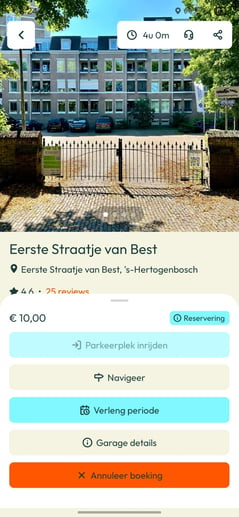
- Open your booking via Bookings (calendar icon)
- Swipe the action bar up
- Press the red button “Cancel booking”
- Confirm the cancellation
- The refund will be processed automatically within 5 business days.
The refunded amount depends on the cancellation policy of the location.
2. The cancellation policy
The cancellation policy can be found in the location’s listing, under the rates section at “Cancellation.”
This information can be found both on the website and app.
There are two important things to pay attention to in the cancellation policy:
-
The time period before the reservation’s start date/time during which you are allowed to cancel.
-
The penalty fee for cancelling the reservation. Cancellation is often free of charge, but a penalty fee may apply—for example, 25%. This means that 75% of the booking costs will be refunded.
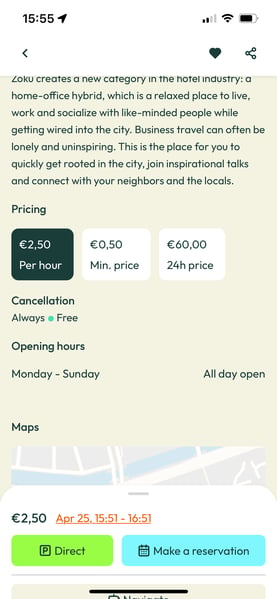
In this example, the reservation can always be cancelled (as long as it hasn’t started yet), and 100% of the booking costs will be refunded.
Need help? Please contact our Live Support via WhatsApp