![Shape 1.png]](https://kennis.myway.app/hs-fs/hubfs/Shape%201.png?height=40&name=Shape%201.png)
To use the MyWay app effectively, you need to link a payment method. In this article, we explain the available options and how to add them to your account.
1. Available payment methods
The following payment methods can be added to the app:
-
iDEAL (for reservations only)
-
Credit card (required for Park Direct)
-
Bancontact
-
Apple Pay
Safety first: MyWay does not store any payment data! All transactions and the security of your details are handled entirely by our certified payment provider.
2. Which method for which booking type?
How you pay depends on the way you park:
| Booking type | Payment method | When do you pay? |
| Reservation | iDEAL or Credit card | You pay upfront while making the booking. |
| Park Direct | Credit card only | You pay per minute; the amount is debited afterwards. |
-
Extending: Do you have a reservation and want to stay longer? You can easily extend your active booking via the blue bar in the app (subject to availability). Click here for more information on extending your reservation.
-
Want to know the difference? Read more about the difference between Park Direct and a reservation.
3. How do I add a payment method?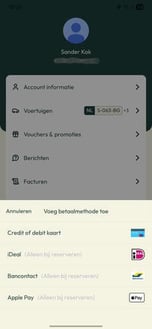
You must link a payment method before you can start a parking session. Follow these steps:
-
Open the MyWay app.
-
Tap on your Account (person icon) in the bottom menu.
-
Go to "Payment methods".
-
Select your preferred method and follow the steps to add it.
Need help? Please contact our Live Support via WhatsApp