![Shape 1.png]](https://kennis.myway.app/hs-fs/hubfs/Shape%201.png?height=40&name=Shape%201.png)
You can easily extend your reservation through the My Way app.
In this article, you will find information about extending your reservation. A Park Direct booking does not need to be extended, as it will automatically continue until you exit.
Did you make the booking through the website? Then download the My Way app, log in with the same account you used to make the reservation, and add your license plate. After that, the reservation will be visible in your app.
Information about making a reservation can be found here.
Extending your booking
If you have made a reservation, you can extend your booking via the app.
Not all locations support extending your reservation. At these locations, this feature is not be visible in the app.
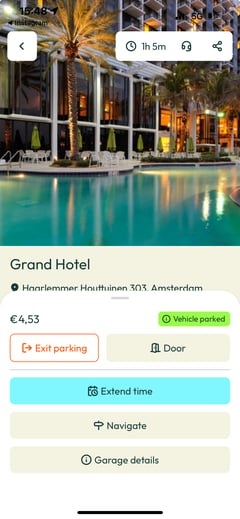
- Go to your current booking via your Home screen or Bookings (calendar icon)
- Select the blue bar labeled “Extend period”
- Enter your new end time & date
- Pay and confirm your extension
Make sure to extend your booking in time to prevent extra charges!
When you have started a "Park Direct", you do not have to extend your booking. This type of booking continues until you want to leave.
More information about Park Directs can be found here.
Need help? Please contact our Live Support via WhatsApp